Ten years ago, Ivan Danilyuk (divan) published Visualizing Concurrency in Go, turning real Go runtime traces into interactive 3D WebGL sculptures. Seeing goroutines and channels unfold in 3D made abstract scheduling rules click immediately.
Python concurrency is arguably even harder to picture in your head than Go’s—because Python doesn’t have just one concurrency model. Depending on how you write your code (and which Python build you run), you are dealing with three very different worlds:
threadingwith the GIL — OS threads that have to share a single Global Interpreter Lock when running Python code.- Free-Threaded Python (
3.13t/3.14twithGIL OFF) — Python’s new multi-core runtime where threads run Python bytecode truly in parallel. asyncio— Single-threaded cooperative tasks that take turns atawaitpoints without spawning OS threads at all.
Every interactive diagram below is a real execution trace recorded from running Python 3.14 code—not a hand-animated mockup. You only need basic Python (def, loops, functions) to follow along.
Prefer a full-screen side-by-side explorer? Open the Fullscreen Interactive 3D Guide ↗, or check out the tracer & local live-runner repo at github.com/noklam/pyconviz.
Part 1: Foundations — How to Read 3D Spacetime
1. Hello, Concurrent World (asyncio vs Thread)
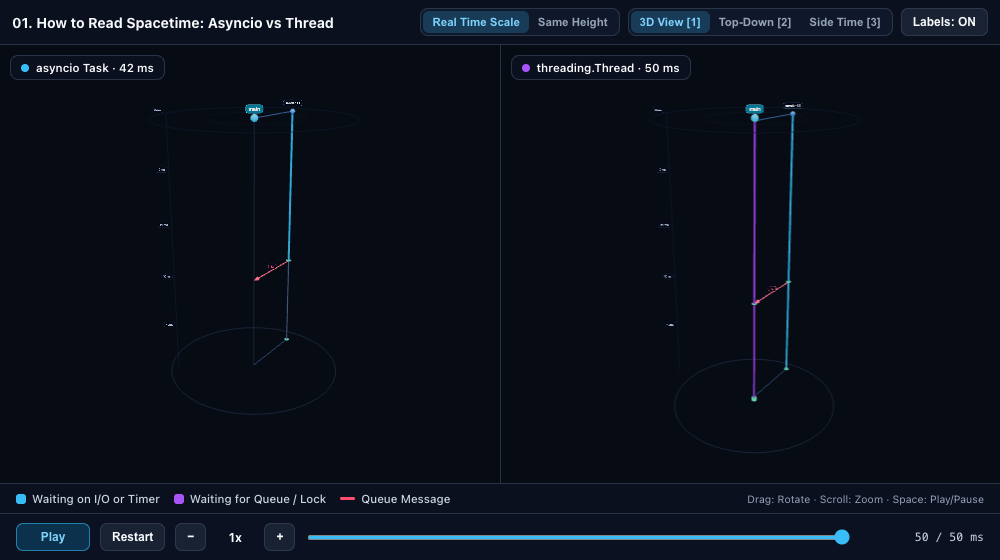
Before looking at the GIL or event-loop bugs, let’s read the simplest possible concurrent program: main starts one helper worker, waits for it to send the number 42 through a Queue, and finishes.
async def sender(ch: asyncio.Queue[int]) -> None:
    await asyncio.sleep(0.025)
    await ch.put(42)

async def main() -> None:
    ch = asyncio.Queue(maxsize=1)
    task = asyncio.create_task(sender(ch))
    value = await ch.get()   # waits for 42
    await task
Here is how to read every 3D scene on this page:
- Time flows downward from
0msat the top ring toward the bottom ring. - Each vertical pillar is a worker (
mainsits in the middle). - Thin blue horizontal bridges mark when
mainstarts a helper (top) and when that helper finishes and rejoinsmain(bottom). - Pink arrows (
42) show a value flying from sender to receiver through a Queue.
2. Waiting Over Time — and What the Three Camera Views Show
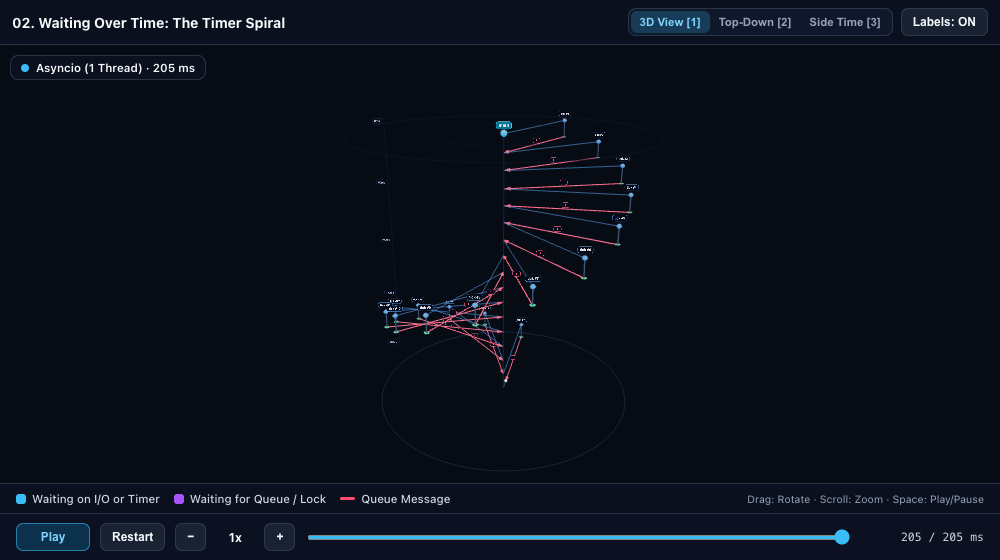
Each interactive card has three camera buttons in its top-right bar (1, 2, 3). A spiral of 16 sequential timers is the easiest place to see what each view means:
3D View [1]shows space and time together—because each timer starts after the previous one finishes, the 16 tasks step downward like a spiral staircase.Top-Down [2]looks straight down from above, collapsing time into a 2D map of who talks to whom (16 timers arranged like a clock face sending1inward tomain).Side Time [3]looks horizontally at the millisecond ruler—any horizontal line across the screen is the exact same instant in time.
3. Fair Turn-Taking: The 12-Player Ping-Pong Ring
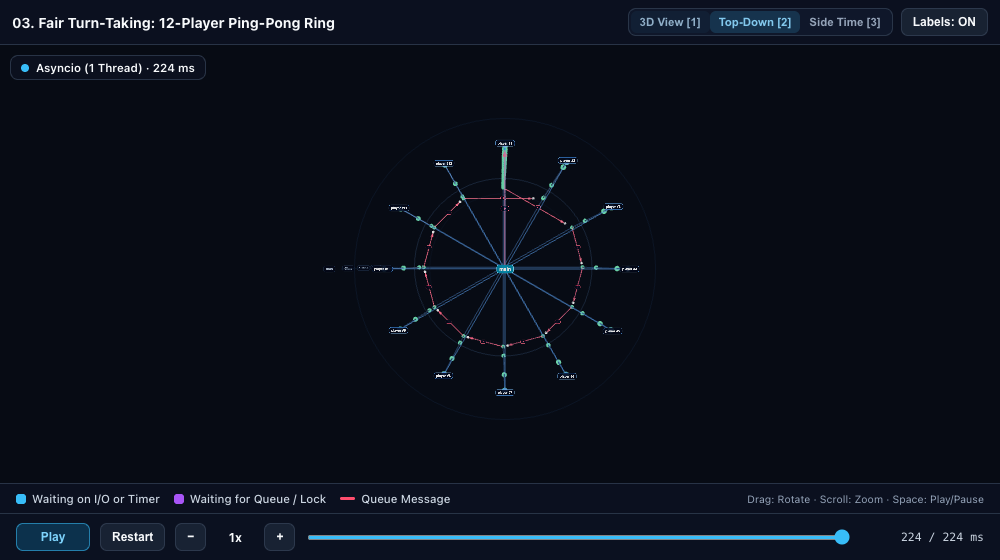
What happens if 12 tasks all listen on the exact same Queue and pass a counter around?
async def player(table: asyncio.Queue[int]) -> None:
    while True:
        ball = await table.get()
        ball += 1
        await slow_swing()
        await table.put(ball)
You might expect the ball to bounce across the circle at random. Instead, looking from Top-Down [2], it traces a perfect 12-sided polygon!
Why? Because Python’s Queue keeps waiting tasks in a First-In, First-Out (deque) line—like a ticket counter. The moment player #1 puts the ball back on the table, it loops around and joins the back of the waiting line. Switch to 3D View [1] to see that flat circle stretch downward into a corkscrew spring over 24 passes.
Part 2: Why Python Threads Behave Differently — The GIL & No-GIL
4. Why Python Threads Don’t Speed Up CPU Work (The GIL vs Free-Threaded 3.14t)
If you come to Python from C++, Java, Go, or Rust, you expect 4 threads doing math on a 4-core machine to finish ~4× faster. In standard Python, they don’t speed up at all.
To keep Python’s internal memory reference-counting simple and safe, standard CPython uses a Global Interpreter Lock (GIL). Think of the GIL as 4 workers sharing 1 microphone: only the worker holding the microphone is allowed to execute Python code!
def cpu_worker(wid: int, results: queue.Queue[str]) -> None:
    acc = wid
    for step in range(450):
        # Pure-Python CPU math loop
        for j in range(2400):
            acc = (acc ^ j ^ step) & 0xFF
    results.put(f"w{wid}:{acc:02x}")
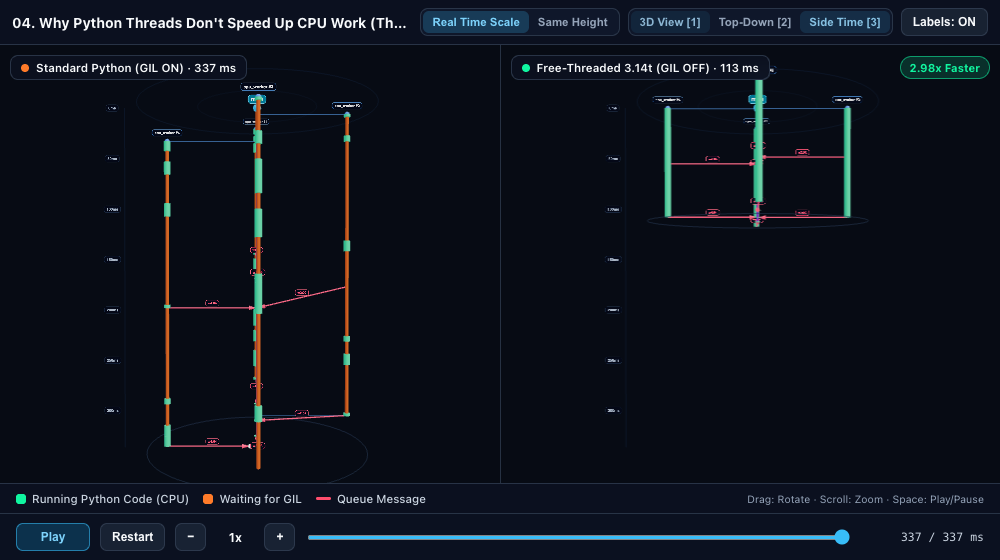
Below is the exact same 4-thread script traced twice on CPython 3.14t—once with the GIL ON (PYTHON_GIL=1, left) and once with the GIL OFF (PYTHON_GIL=0, right) in Real Time Scale:
- Left (Standard Python — GIL ON): Scan horizontally across the pillars at any height. Only ONE worker is green (
Running Python Code) at a time! Every ~2ms Python pauses that thread and hands the GIL to the next one, leaving 3 out of 4 threads stuck in orange (Waiting for GIL) for over 60% of the run (354 ms). - Right (Free-Threaded
3.14t— GIL OFF): All 4 worker pillars glow solid green simultaneously across 4 CPU cores with 0% GIL wait, finishing in83 ms(4.3× faster)!

5. When Standard Python Threads Do Work: Waiting on I/O vs asyncio
If standard Python’s GIL only lets one thread run Python code at a time, why have Python engineers happily used threading to speed up web scrapers, API calls, and database queries for decades?
Because waiting on external I/O drops the GIL microphone!
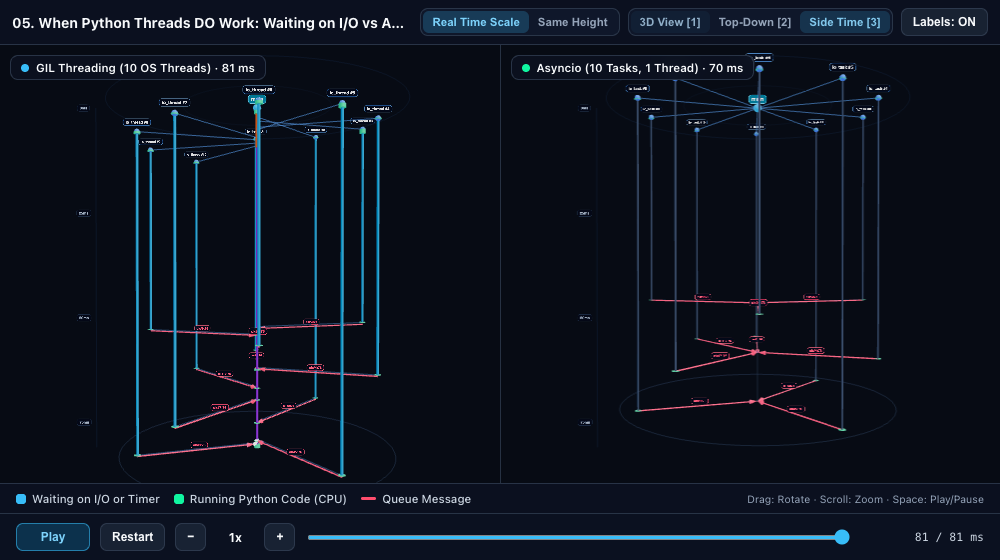
When a thread calls slow_io_task() (waiting for a network socket, database query, or disk read), Python releases the GIL while the operating system waits. All 10 threads wait in blue at the same time, finishing 10 × ~55ms requests in ~80ms instead of 550ms!
Compare that against asyncio on the right: asyncio achieves the exact same ~70ms speedup using just 1 OS thread. Instead of asking the OS for 10 separate thread stacks, 1 Python thread starts all 10 requests and juggles them with await—which is why asyncio can comfortably handle 10,000+ concurrent connections where spawning 10,000 OS threads would struggle.
6. Without the GIL: Shared Data Still Needs a Lock
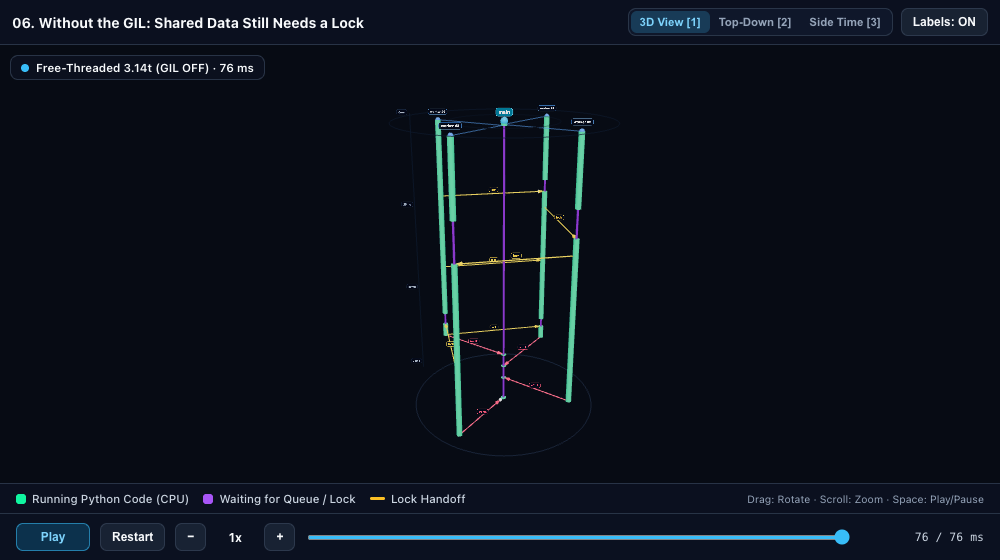
Turning off the GIL (PYTHON_GIL=0) removes Python’s global lock, not the laws of data races! If 4 parallel threads append to or mutate shared state at the same time, you still need a threading.Lock:
def account_worker(wid: int, ledger_lock: threading.Lock, ledger: list[int]) -> None:
    for _ in range(3):
        local_digest = fast_parallel_math(wid)   # Runs on all 4 cores at once!
        with ledger_lock:                        # Only 1 thread can enter at a time
            update_shared_ledger(ledger, local_digest)
Watch what happens in 3D when with ledger_lock: wraps a slow critical section: all 4 pillars burn green in parallel during their private math, then hit a traffic jam in purple (Waiting for Lock) as yellow Lock Handoff arrows pass the lock single-file from one thread to the next.
Takeaway for free-threaded Python: do your heavy computation outside with lock:, and keep locked sections as tiny as possible.
Part 3: Asyncio’s Golden Rule — Blocking vs. Native await vs. to_thread
7. Three Ways to Handle a slow_task in asyncio
Because asyncio runs all of your tasks on one single thread, a task only gives other tasks a turn when it hits an await.
Suppose your server has 4 background heartbeat tasks ticking every 18ms, and a request_task needs to run a slow operation. Beginners often ask: “Should I use await or asyncio.to_thread()?” Seeing all three side by side makes the difference crystal clear:
# 1. THE TRAP: Calling a normal synchronous slow_task() directly
async def handle_request():
    result = slow_task()                    # Hijacks the 1 thread — freezes everything!

# 2. NATIVE ASYNC: Using an async-native library (async HTTP, async DB, asyncio timers)
async def handle_request():
    result = await slow_async_task()        # 0 extra threads! OS watches the wait.

# 3. THREAD OFFLOAD: Wrapping a synchronous slow_task() that has NO async version
async def handle_request():
    result = await asyncio.to_thread(slow_task)  # Borrows +1 helper OS thread!
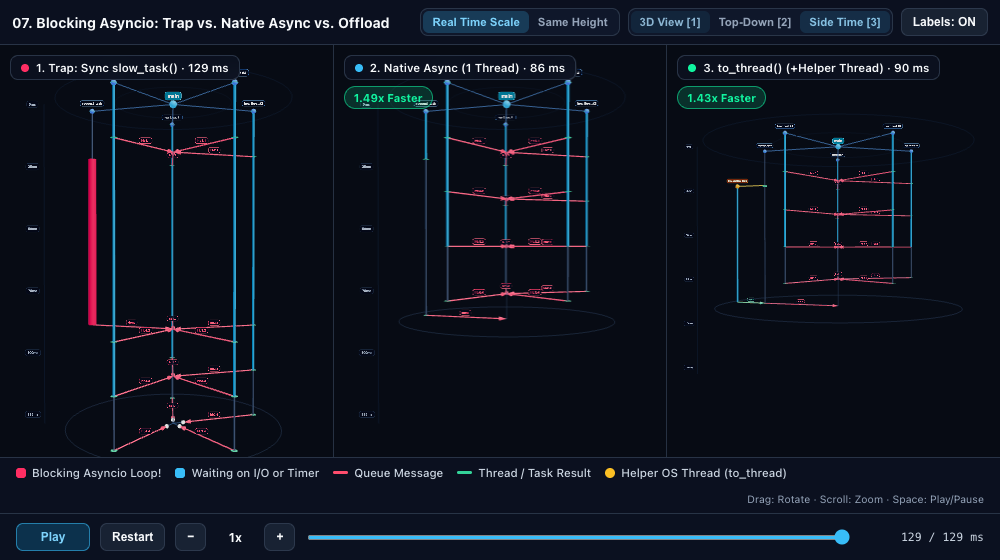
Look closely at the three panes above:
| Strategy | What You See in 3D | Extra OS Threads | When to Use |
|---|---|---|---|
1. Trap: slow_task() | A thick red bar (Blocking Asyncio Loop!) appears—and zero pink heartbeat arrows fire anywhere until it ends! | 0 (hijacks main thread) | Never inside async def |
2. Native Async: await slow_async_task() | request_task waits in thin blue while pink heartbeat arrows keep firing right on schedule. | 0 extra threads | First choice whenever an async library exists (httpx, aiohttp, asyncpg) |
3. Offload: await asyncio.to_thread(slow_task) | Spawns a gold helper thread (thread:slow_task) off to the side so the event loop stays free, returning a green result arrow when finished. | +1 worker thread | When calling synchronous libraries (requests, boto3, local file I/O) that don’t support async |
How It Was Built & Running Your Own Code
To stay faithful to divan’s original Go visualizer, none of these traces are mocked:
asynciotracing wraps the event loop’s task factory and coroutine.send()turns to measure exact microsecond turn durations (flagging any synchronous turn over threshold asblocking_loop), queue message correlation, andto_thread()worker lifespans.threading& GIL tracing uses lock-free per-thread buffers combined with pulsed PEP 669 (sys.monitoring) bytecode sampling on CPython3.14t, keeping tracing overhead under ~2% soPYTHON_GIL=0runs at genuine multi-core speed while still capturing exact 2ms GIL handoffs underPYTHON_GIL=1.- 3D Spacetime rendering uses Three.js with instant
O(1)timeline scrubbing and frustum-fitted camera presets.
Want to edit the Python snippets and trace your own asyncio or free-threaded 3.14t code live? Clone noklam/pyconviz and launch the local playground (which unlocks a live Run Live editor tab):
git clone https://github.com/noklam/pyconviz.git
cd pyconviz
uv sync
uv python install 3.14t          # optional: enables GIL=1 vs GIL=0 live comparison
uv run pyconvis serve --open     # opens http://127.0.0.1:8765 with Live Code Runner